Field Notes · By Stephen Gilfus · April 1, 2026
The forgotten birth of the LMS, 1997
Operational history from Cornell labs to CourseInfo and first rollouts
What did 1997 really look like when the LMS arrived? Inside Cornell labs, web servers, CourseInfo, and the operational conditions that made courseware a campus service.
Introduction
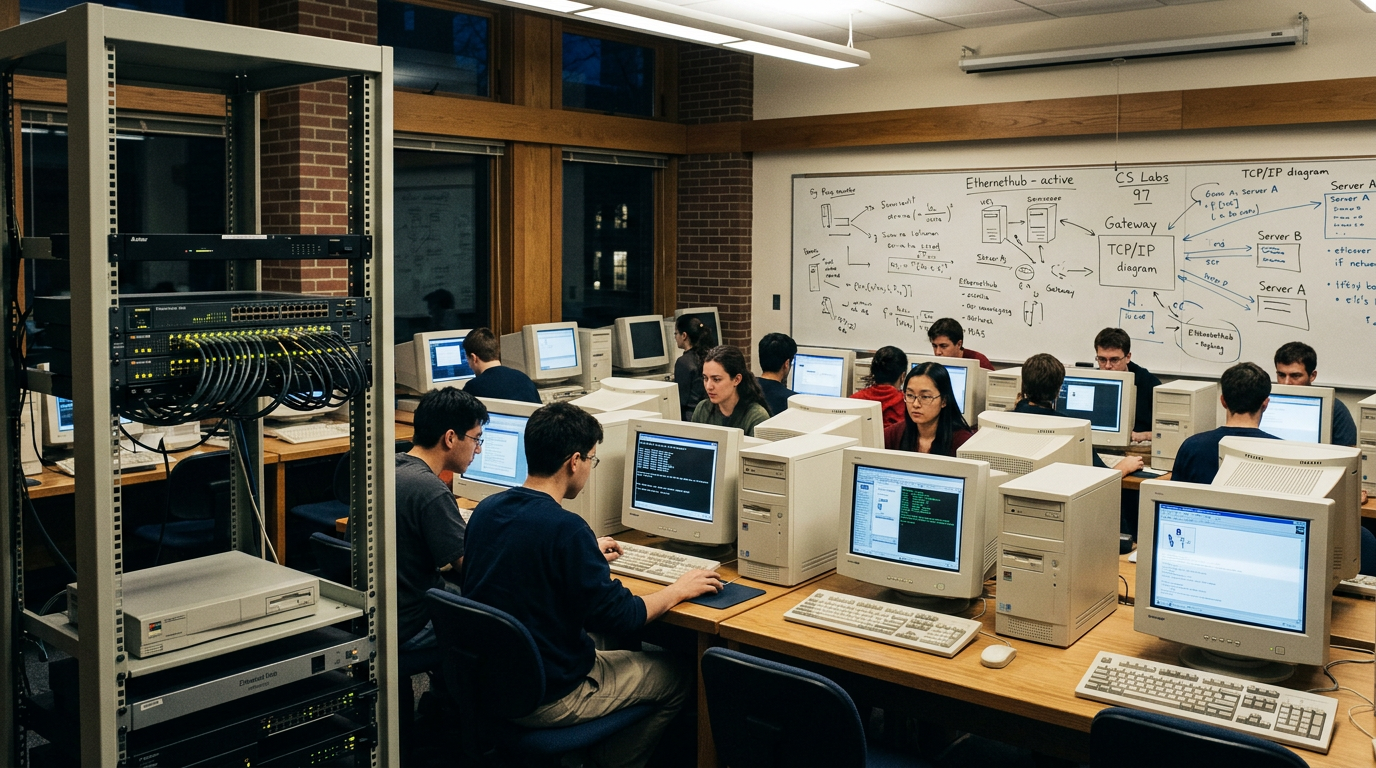
In the spring of 1997 at Cornell, the hallway outside a departmental computer lab told the real story: carts of beige desktops queued for imaging, a whiteboard tracked who had which IP address, and a professor was waiting for a TA to post a revised syllabus to a hand-coded HTML page. This was not a “category in search of a name.” It was a day where too much coordination moved through email, paper, and ad hoc web pages—and where one very specific operational change had become feasible. The campus had web servers, browsers were on nearly every lab machine, and authentication to a central directory worked well enough. The parts were sitting on the table. We just had to fit them together.
Think of it as laying track just ahead of a train that had already started to move. Faculty were already putting pieces of a course online: a PDF here, a listserv there, links on a department site, a TA-built form for assignment uploads. Students were already checking for updates between classes. The traffic existed. What did not exist was a system that would consolidate these moves into one predictable location for each course, across an institution, without asking every instructor to become a web developer. That is what the first year of the learning management system—LMS 1997—looked like from the ground.
This is an operational history of that formation year. Not an abstract arc, but the sequence of real conditions and decisions that made an LMS possible at all: the state of Cornell’s computing environment, the web servers we ran, the way rosters moved, the browser versions on lab machines, the faculty concerns that drove requirements, and the small product choices that made adoption likely. It explains why CourseInfo came together in 1997 at Cornell, how similar efforts at other universities framed the category, and how governance, budgets, and standards followed the operational reality rather than leading it.
Cornell looked like this
Walk into a Cornell computer lab in early 1997 and you would see 10Base-T and 100Base-T Ethernet drops, Netscape Navigator 3 and early 4.x on Windows and Mac stations, and a central web server hosting departmental sites. Students accessed email through various clients; faculty kept course handouts in manila folders and sent updates to class listservs. The web was present, but course information lived in fragments.
- Authentication worked, but it wasn’t single sign-on as we know it today. Campus directories held identities; systems authenticated against them in their own ways. That was good enough to think about protected course spaces.
- Web servers were routine. A departmental site often meant a small Unix box under a desk or a centrally hosted virtual directory. CGI scripts and Perl were common. Uploading a file required the right client and remembering the path.
- Roster data lived in the student information system (SIS) and could be exported, but not on a schedule that matched every department’s needs. Spreadsheets were the synchronization method.
- Support organizations—teaching and learning centers, instructional technology groups—were ready. They ran faculty workshops on HTML and scanning images. They had the staff to train but not the bandwidth to be every professor’s webmaster.
The operational pain was simple: if a professor changed a reading list at 10 p.m., getting it online by morning required a chain of people. Students did not know where to look. Reliability meant redundancy of communication—post to the page, send the email, and say it in class—and even then, someone missed it.
> The web had raised the expectation of currency without providing a common container.
Cornell was not unique in this profile, which is the point. The campus had what many peers had by 1997: browser saturation in labs, networked dorms, a central directory, and a culture accustomed to software rollouts. That shared baseline made the same solution plausible across institutions.
Lesson — Treat the browser as the universal client.
Meet people where they are by ensuring any system runs in the browser versions already deployed in labs and faculty offices. By 1997, the saturation of Netscape and Internet Explorer meant there was a shared interface for accessing information. A solution that worked in the browser required no new client software, removing a major barrier to adoption for instructors and students alike.
The pressure on TAs and support staff
The friction concentrated in two roles: teaching assistants and departmental support. TAs fielded constant student questions about where to find files and how to submit assignments. Departmental staff managed listserv subscriptions, posted files to web directories, and kept a mental index of professor preferences. The right system would not eliminate this work; it would consolidate it into a predictable process and move more of it into self-service for faculty and students.
The policy readiness
There is a governance subtext that mattered. By 1997, many campuses had policies for acceptable use of computing resources, privacy of student information (FERPA in the U.S.), and data backup. These policies provided a permissive environment for a course-level system with authentication. Without that floor, a shared system could have been seen as risky. With it, the question was not “may we?” but “how do we?”
The problem we had to solve
The stated problem was “we need a course website.” The real problem was different: instructors needed a reliable place students would check by default; departments needed a way to provision courses without a sculpted build for each instructor; and the institution needed a framework that would scale from dozens to thousands of courses.
At the feature level, this translated into a specific set of workflows:
- Announcements with timestamped visibility and optional email copies.
- A place to post files in a structure students could navigate without design help.
- Discussion forums that could be moderated, archived, and easily reset.
- Basic assessment tools that did not require a separate testing platform.
- Roster awareness, so the system knew who was in the course without rekeying.
- Role separation: instructor, TA, student—with permissions that mapped to real campus norms.
The constraint set was equally concrete. Everything had to run in existing browsers. Departments had to be able to move quickly with minimal dependency on central IT. Most of all, data for a course had to be reusable the next term.
Lesson — Respect the calendar as an unmovable constraint.
Deliver within the academic calendar's cadence and use its deadlines to build momentum. The semester sets an inflexible timeline; missing a term meant waiting 90 more days to try again. Any system had to be capable of setup in days, not months, to be relevant. This constraint forces pragmatism and focuses efforts on what is possible right now.
What made this period decisive is that the constraints were finally compatible with the workflows. In 1995, the same request would have forced client software installs and custom programming for each course. By 1997, commodity web servers, maturing browsers, and campus directories made an integrated system plausible.
Building CourseInfo at Cornell
CourseInfo began in 1997 at Cornell—not as a grand design, but as a response to these pressures. The initial goal was to package the most common course web tasks into a system an instructor could use with minimal help. I co-founded CourseInfo with Dan Cane that year, drawing on the day-to-day rhythms of Cornell’s courses and the repeated asks showing up in support tickets and hallway conversations.
> The design principle was simple: make the next Tuesday easier for everyone already involved.
The early product made a few bets that turned out to be load-bearing: course shells by default, built-in announcements, discussion boards, roster sync, and a term reset feature.
Lesson — Provision new courses by default to encourage immediate use.
Start users with a populated environment so they are not staring at an empty canvas. Every registered course got a “home” with the right roles and a starter structure. Provisioning was the baseline, not a special request. An empty shell is an invitation to stall; a pre-populated structure with default navigation suggests immediate action and makes the first steps obvious.
Technically, the work was pragmatic. We targeted the browsers and server stacks universities already ran, authenticated against the campus directory, and supported batch roster imports. We kept the installation footprint small enough that a department with one server could host dozens of courses.
Where Blackboard enters
In Washington, D.C., in 1997, two entrepreneurs—Michael Chasen and Matthew Pittinsky—founded Blackboard Inc. The company’s early work included supporting standards efforts around what would become IMS. In late 1998, CourseInfo and Blackboard merged, bringing together a product rooted in Cornell’s operational reality and a team focused on category definition and enterprise adoption. The combined entity carried the Blackboard name. Years later, in 2004, the company went public on NASDAQ under the ticker BBBB. Those later milestones show that the category built from on-the-ground feasibility, then scaled.
What made an LMS possible
The phrase “conditions of possibility” names the specific inputs without which the LMS would have stalled as a set of one-off projects. In 1997, several key conditions aligned across many campuses.
1) Browser saturation and shared mental models
By 1997, Netscape Navigator 3/4 and early Microsoft Internet Explorer were on lab machines and faculty desktops. Basic HTML was a shared literacy, and the idea of a “home page” had diffused into popular usage. This allowed a course site to be understood as “the place where the course lives,” borrowing the mental model from the broader web.
2) Campus networking and central web hosting
Ethernet to labs and dorms, dial-up for commuters, and central web servers running commodity stacks meant that hosting a system for hundreds of concurrent students was possible without special hardware. The institution already had a home for web-facing systems.
Lesson — Fit into existing enterprise infrastructure instead of demanding a new one.
Act as a guest in the institution's house by keeping the system's footprint simple and its contracts with other systems explicit. The LMS could succeed by using the web servers, authentication directories, and networking that campuses already had. This approach allowed the LMS to be deployed like other campus web services, fitting into existing operations rather than requiring a new category of support.
3) Authentication good enough for course spaces
Campus directories were in place, and authentication to a trusted source existed. Combined with roles (instructor, TA, student), this allowed a course space to be provisioned with access controls that reflected campus norms, enabling protected discussions and private materials.
4) Roster data export and import
Student information systems could export enrollment lists, which could be imported into a course system. Real-time integration came later, but nightly or weekly syncs were feasible. This meant course spaces reflected who was enrolled without manual adds, reducing staff overhead.
5) Support organizations ready to pivot from building to training
Teaching and learning centers were already teaching HTML. An LMS allowed them to shift from building pages to training and consulting on pedagogy within the system. Support hours moved from repetitive tasks to higher-value work, accelerating adoption.
6) Early standards signals and procurement confidence
IMS began as a project in 1997 under EDUCAUSE. Although standards would take years to solidify, the effort signaled to CIOs that interoperability was on the table. The naming of a category was a governance move that reduced perceived risk for early adopters.
How a rollout worked in 1997
Strip the narrative down to the steps, and a campus rollout in 1997 followed a recognizable template. A dean sponsored a pilot for a defined set of courses. A server was prepped, the software installed, and a runbook written for backups and patches.
Step 1: Choose scope and sponsor
A dean or department chair committed to piloting the system for a semester with a defined set of courses. The sponsor mattered because adoption is social; faculty move with their peers. This sponsor also controlled local resources—lab time, a server, and TA hours.
Step 2: Prep the server and the runbook
The campus identified a server to host the LMS. We installed the software, tested against the campus directory, and wrote down the backup and patch schedule. Agreeing on maintenance windows with instructors prevented support tickets at 2 a.m.
Step 3: Provision courses and roles
We set up course shells for the pilot classes, assigned instructors and TAs, and created the default navigational structure. The principle was “start full.” An empty shell is an invitation to stall; a pre-populated structure suggests action.
Step 4: Move rosters
We imported enrollment lists from the SIS, often as CSV files. Late adds and drops were handled either through a weekly refresh or by empowering instructors to add a student until the next sync. Giving instructors ability to adjust at the margins avoided support backlogs.
Step 5: Train for the first week, not the whole toolbox
Faculty training focused on the tasks they would perform in the first week: posting the syllabus, creating an announcement, and uploading a reading. The rest could wait. Students received a one-page orientation in their first course shell.
> A working announcement on day one did more for adoption than a tour of every feature.
Lesson — Make the first fifteen minutes of use create an obvious win.
If the initial experience does not produce a visible improvement for the instructor and student, the design has failed. Training should focus on the tasks for the first week, like posting an announcement, ensuring faculty see immediate value. Early wins mattered because a single successful action did more for adoption than a tour of every feature.
Step 6: Support and iterate with a tight loop
We staffed office hours and answered tickets quickly. Changes made in the first month based on the most frequent issues set expectations for the next term. The list of repeated questions became the roadmap for defaults, wording, and documentation.
Step 7: Archive, reset, and scale up
At term’s end, we archived course sites, reset shells, and moved improvements into the default template. The next term was larger, not because of a marketing campaign, but because faculty who had seen a neighbor’s site asked for their own. The social proof was local and credible.
Category takes shape 1996–1999
No product is born in isolation; a category forms around a set of related responses to the same conditions. Between 1996 and 1999, several named efforts defined what “courseware” and “learning management” meant in practice.
- WebCT emerged from the University of British Columbia in 1996, making it one of the first widely adopted web-based course systems in higher education.
- CourseInfo formed in 1997 at Cornell with a product rooted in the day-to-day needs of instructors and students.
- Blackboard Inc. was founded in 1997 in Washington, D.C., with early work connected to standards. The 1998 merger with CourseInfo combined product and platform narratives.
- Commercial offerings like Lotus LearningSpace and corporate-focused systems like TopClass from WBT Systems contributed patterns around discussions and assessments.
- IMS launched as a project in 1997, signaling that interoperability would be part of the category’s DNA.
This period followed a familiar formation sequence: experimentation, fragmentation, first standards, commercialization, and early consolidation. The label “LMS” stabilized not because someone named it from a podium, but because operations demanded a shared term for budgets, support, and policy.
What changed on day one
In a pilot semester, three things became obvious. Faculty controlled the tempo of communication. Students had one predictable place to look. And support staff shifted from building to coaching.
> People do not fear change. They fear loss.
Those shifts were additive. They did not remove an instructor’s preferred tools; they provided a backbone that made those tools easier to find and use. The first-year LMS experience was framed as something gained: time, predictability, and a shared location.
Lesson — Design for local adaptation by keeping an extension surface in mind.
You cannot predict every campus's workflow, so build in a way that invites adaptation without forking the core code. Campus heterogeneity was obvious from the first installations, with differences in operating systems, authentication protocols, and storage policies. We learned quickly to design for extensibility so that local teams could adapt workflows, a seed of what later matured into official developer platforms.
The mid-course correction: track and train
Here is where the metaphor returns. Laying track ahead of a moving train was not a one-time act. As adoption grew, we refined the route: default course structures were simplified; language in the UI was made more literal; discussion tools were moderated by default. We learned to place the rails where instructors already walked, not where we wished they would go. The train did not slow; the track got better.
The bet I’d make today
If I had to compress the first year of the LMS into a single philosophy, it would be this: start from operational reality and design for the next Tuesday, not the next keynote. In 1997 at Cornell, the LMS was not a theory; it was a path through a hallway crowded with carts of PCs, faculty knocking on the lab door, and a TA triaging listserv errors. The category formed because we solved for that day and built a system that campus operations could carry forward.
The logic that worked then still translates. Meet people where they are by treating the browser as the client. Be a good guest in the enterprise house, fitting into existing authentication and hosting. Make use easy by provisioning default course sites and making early wins obvious. Always remember that semesters are immovable and respect the calendar. Plan for the future by keeping an extension surface in mind, because you cannot predict every campus workflow.
Applied to today’s builders—whether you are extending an LMS, building a new assessment system, or stitching AI into course delivery—the same operating logic holds. Look for the pattern of informal work already in motion. Codify it in a system that removes steps without taking away control, and name the gains in the language your users already use. Standards and governance will follow if the day-to-day experience is better. The train is always moving. The work is to place rails where the traffic already flows and to make each next stretch smoother than the last.
Share
Preview LinkedIn copy
1997 didn’t feel like a product launch. It felt like carts of beige PCs, wiring closets, and faculty emails stacking up. That was the operational ground where the learning management system became real at Cornell.

The immediate problem was not abstract. Thousands of students, hundreds of courses, and course information scattered across paper, listservs, and hand-coded HTML. TA time—not technology—was the bottleneck. Faculty wanted one place to post the syllabus, readings, and announcements without calling a departmental webmaster every week.

What had changed by 1997: browsers (Netscape 3/4) were standard on campus machines; Ethernet to labs and dorms was routine; central web servers and basic authentication were in place. The feasibility window opened for a shared, authenticated “course home.”

CourseInfo started at Cornell in 1997 to productize what faculty were already trying: announcements, files, discussions, rosters, basic assessments. The move was simple but decisive—give every course a system, not a page. Operationally, a campus rollout meant: pick a server, wire power and backup, install software, authenticate against campus directories, batch-roster from the SIS, and train faculty. No magic—just real work and better outcomes.

The category formed quickly around us: WebCT (UBC, 1996), CourseInfo (Cornell, 1997), Blackboard (DC, 1997), and Lotus LearningSpace. IMS launched in 1997 under EDUCAUSE, pointing to common packaging and metadata. Fragmentation first, standards later.

Day-one gains were visible: faculty controlled updates, students knew where to look, and support shifted from “build a page” to “use the system.” Chaos gave way to reliability and governance.

I co-founded CourseInfo in 1997; in late 1998 we merged with Blackboard. Years later we went public on NASDAQ as BBBB. The lesson that carried through: start from operational reality and design for the busy Tuesday in a campus lab, not the keynote slide.

If you’re building new education infrastructure now, the early LMS playbook still holds. Start with what’s already working informally, make it additive to people’s workflows, and earn adoption one practical improvement at a time.

Curious about the operational history behind LMS 1997 at Cornell and the conditions that made it possible? Read the full post and share your take.

#EdTech #HigherEd #LMS #InstructionalDesign